Gradient Constraints
Gradient constraints are geometric rules enforced by an iterative solver. Each constraint below is shown as a video of the actual solver run (one frame per optimization step — these are real trajectories, not animations).
OverlapConstraint and OutOfBoundsConstraint run automatically during every room compilation — you never add them yourself.
Adding custom constraints
ClearanceConstraint, AccessConstraint, and VisibilityConstraint are opt-in. Every group exposes a one-line registration helper for each; call it inside the with block and the constraint is re-applied on every compile, after the automatic constraints and before the solver runs:
with scene.BasicRoomGroup(6.0, 5.0, 3.0) as room:
    room.place([cabinet, chair],
               positions=[(3.0, cabinet.get_height() / 2, 4.5),
                          (3.0, chair.get_height() / 2, 3.6)],
               rotations=[180, 0])
    room.add_clearance(cabinet, distance=0.8, dir="front")
| Helper | Registers |
|---|---|
add_clearance(obj, distance=0.5, dir="front", omit_objs=None) | ClearanceConstraint |
add_access(obj, target, min_dist=0.1, max_dist=0.15, dir="front") | AccessConstraint |
add_visibility(source, target) | VisibilityConstraint |
These work on any group (RoomGroup, BasicRoomGroup, or the pattern groups). The sections below describe each constraint’s parameters.
OverlapConstraint
Ensures no two objects intersect. For each overlapping pair it pushes the objects apart along the line between their centers, by an amount proportional to how deeply they overlap.
Objects flagged ignore_overlap (rugs, items placed on top of others, wall art) are exempt.
# runs automatically; nothing to call
with scene.BasicRoomGroup(6.0, 5.0, 3.0) as room:
    room.place([sofa, table, chair],       # y = h/2 rests each object on the floor
               positions=[(2.3, sofa.get_height() / 2, 2.5),
                          (2.5, table.get_height() / 2, 2.5),
                          (2.7, chair.get_height() / 2, 2.5)],  # stacked
               rotations=[0, 0, 0])
Three objects start stacked at nearly the same point and are separated into a clean, non-overlapping row.
OutOfBoundsConstraint
Pulls any object whose bounding box crosses a room wall back inside. The room must define WIDTH and DEPTH (every RoomGroup does). A small deterministic clamp at the end of optimization guarantees nothing ends up outside, even in tightly packed scenes.
The sofa starts pushed off the right edge of a 5 m-wide room and is pulled fully inside.
ClearanceConstraint
Reserves a minimum amount of free space around an object — circulation space in front of a sofa, room to open a wardrobe’s doors, etc.
room.add_clearance(cabinet, distance=0.8, dir="front")
| Parameter | Type | Default | Description |
|---|---|---|---|
obj | object | required | The object to keep clear. |
distance | float | 0.5 | Minimum free space to maintain, in metres. |
dir | str | "front" | Where to enforce clearance: "front", "sides", or "all". |
omit_objs | list | None | Objects to ignore when measuring clearance. |
"front"— clear space only in front of the object’s facing direction."sides"— clear space to the left and right."all"— clear space on all four sides.
A lounge chair parked right in front of a storage cabinet is pushed away until the cabinet’s doors have the requested 0.8 m to swing open.
AccessConstraint
The complement of clearance: it keeps a target object within a reachable distance band of another — a coffee table in front of a sofa, a nightstand beside a bed. If the target drifts too far it is pulled back; if it is too close it is nudged out, so the gap stays in [min_dist, max_dist].
room.add_access(sofa, table, min_dist=0.3, max_dist=0.45, dir="front")
| Parameter | Type | Default | Description |
|---|---|---|---|
obj | object | required | The reference object (e.g. the sofa). |
target | object | required | The object kept within reach (e.g. the coffee table). |
min_dist | float | 0.1 | Closest allowed gap, in metres. |
max_dist | float | 0.15 | Farthest allowed gap, in metres. |
dir | str | "front" | Which side to measure: "front" or "sides". |
A coffee table drifting across the room is pulled back within arm’s reach of the sofa — close enough to set a cup down, far enough to walk past.
VisibilityConstraint
Keeps the sightline between a source and a target clear — for example, between a sofa and a TV. Any object intruding into the viewing corridor is pushed sideways out of it.
room.add_visibility(sofa, tv)
| Parameter | Type | Description |
|---|---|---|
source | object | One end of the sightline (e.g. the viewer’s seat). |
target | object | The other end (e.g. the screen). |
A plant sitting directly between the sofa and the TV is moved aside, clearing the sightline.
Writing your own constraint
The five constraints above are not special-cased anywhere: they are ordinary classes that subclass ConstraintBase, and anything you write the same way is solved by the same solver. A gradient constraint is three attributes and one method.
import numpy as np
from IDSDL.constraints import ConstraintBase


class MyConstraint(ConstraintBase):
    def __init__(self, group, ...):
        self.name = "MyConstraint"     # label; shows up in the compile report
        self.type = "GRADIENT"         # "GRADIENT" or "VLM" — picks the solver
        self.weight = 1.0              # scales every gradient this class emits
        super().__init__(group)        # registers the instance on the group

    def compute_gradients(self):
        ...                            # read geometry, write obj.grad
Set name, type, and weight before calling super().__init__(group) — the base class reads self.type to decide where the instance belongs, appending it to group.constraints and to group.grad_constraints (or group.vlm_constraints). That is the whole registration; there is no separate “enable” step.
compute_gradients() is called once per solver iteration. It reads the current geometry — obj.get_aabb(), obj.get_location(), obj.get_rotation(), or the Raytracer2D helpers (overlap, compute_free_space) that the built-in constraints use — and writes a force onto obj.grad, a 3-vector in world metres. Always accumulate with +=: every constraint in the group writes into the same per-object accumulator, and the solver zeroes it at the top of each iteration. Return values are ignored for gradient constraints (only VLM constraints return anything).
GradSolver does the rest, identically for your class and for OverlapConstraint: up to 100 iterations, each one zeroing every gradient, calling every registered compute_gradients(), converting the accumulated vectors into ±x/±z moves weighted by the free space available in each direction, and applying them at a learning rate of 0.3. It stops early once the average gradient norm falls below 1e-3, then runs a deterministic settle pass that guarantees no overlaps and nothing out of bounds.
A worked example: AlignToWallConstraint
A rule the built-ins don’t cover: pull a specific object straight back until its rear edge rests against a wall — the way a bookcase or a media console actually wants to sit.
class AlignToWallConstraint(ConstraintBase):
    """Pull an object straight back until its rear edge rests against a wall."""

    def __init__(self, group, obj, wall="back", gap=0.05):
        self.name = "AlignToWallConstraint"
        self.type = "GRADIENT"
        self.weight = 1.0
        self.obj = obj
        self.wall = wall
        self.gap = float(gap)
        super().__init__(group)

    def compute_gradients(self):
        aabb = self.obj.get_aabb()
        if self.wall == "back":                    # the z = 0 wall
            offset = float(aabb[0, 2]) - self.gap  # > 0 while out in the room
            axis = np.array([0, 0, -1], dtype=np.float32)
        else:                                      # "front": the z = DEPTH wall
            offset = float(self.group.DEPTH) - self.gap - float(aabb[1, 2])
            axis = np.array([0, 0, 1], dtype=np.float32)
        self.obj.grad += axis * offset * self.weight
The gradient is a restoring force, not a one-way push: offset is positive while the object is still out in the room and negative if it overshoots past the requested gap, so the same line handles both. self.group is set by the base class, which is how the "front" branch reaches the room’s DEPTH.
Registering it
Constraints that take arguments can’t be added automatically — the engine has no way to guess which object you meant. Register them with add_constraint_hook, a callable that receives the group and is re-run on every compile, after the automatic constraints and before the solver:
with scene.BasicRoomGroup(6.0, 5.0, 3.0) as room:
    room.place([shelf, console],
               positions=[(1.7, shelf.get_height() / 2, 2.7),
                          (4.3, console.get_height() / 2, 2.7)],
               rotations=[0, 0])
    room.add_constraint_hook(lambda g: AlignToWallConstraint(g, shelf, wall="back"))
    room.add_constraint_hook(lambda g: AlignToWallConstraint(g, console, wall="back"))
This is exactly what add_clearance, add_access, and add_visibility do internally — they are one-line wrappers around add_constraint_hook.
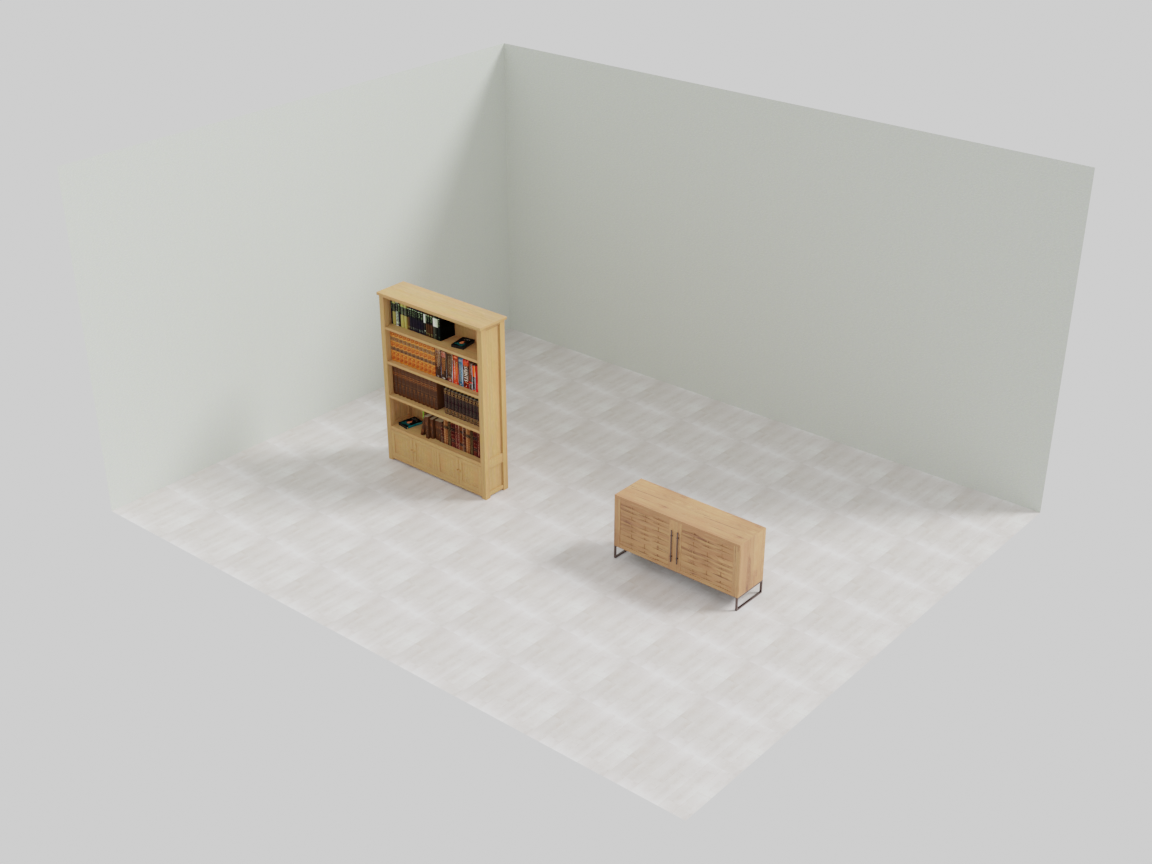
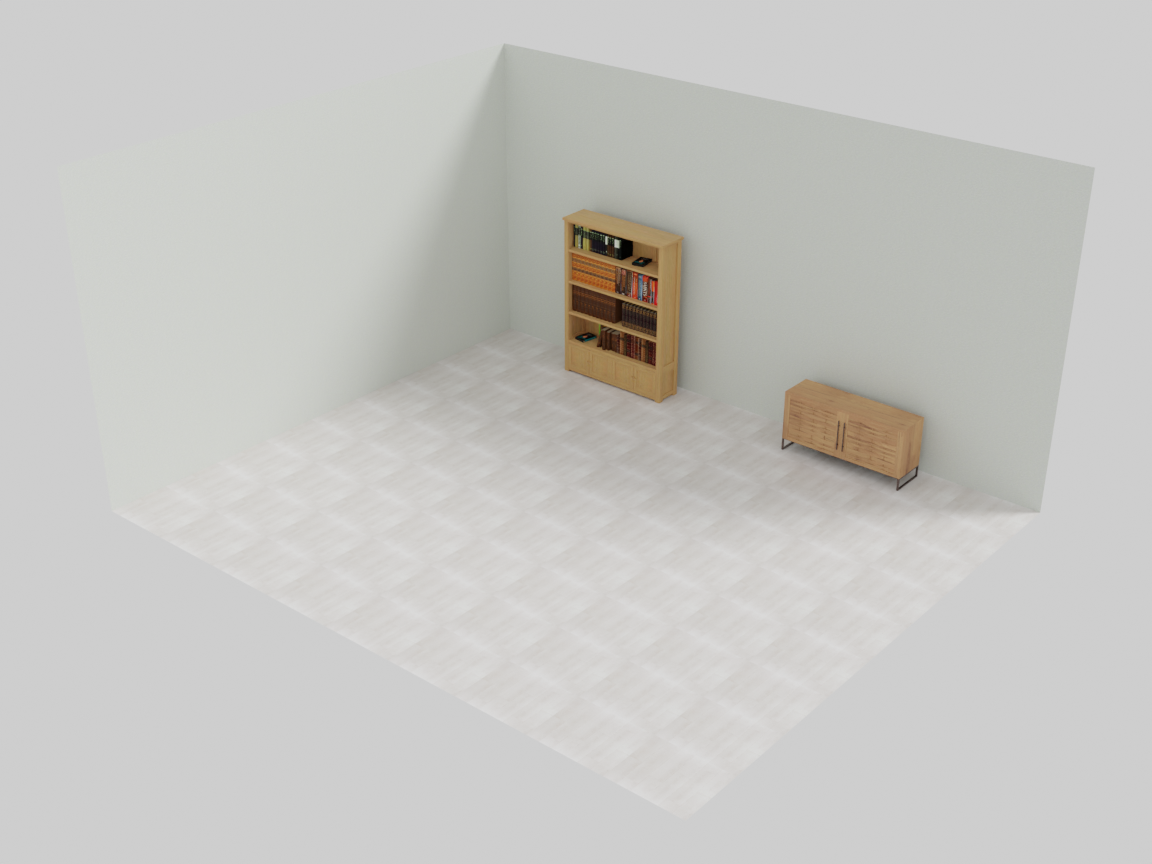
Left: no hook registered — both pieces stay where they were placed, 2.54 m and 2.52 m out from the back wall. Right: the same program with the two hooks — the solver walks them back to 0.11 m.
Both pieces were placed at z = 2.7, leaving their rear edges 2.54 m and 2.52 m from the back wall. With the constraint registered the solver brings both to 0.11 m. It stops a few centimetres short of the requested 0.05 m gap and the exact residual moves by about a centimetre between runs: the solver weights each candidate move by the free space in that direction, so the last few centimetres into a wall are damped. RoomGroup handles this for its own wall placements with a deterministic post-pass (_repin_wall_furniture) that snaps wall-adjacent furniture flush after the solve. Take the same approach if you need a hard guarantee — gradient constraints express preferences, not invariants.
Making it available everywhere
CONSTRAINTS at the bottom of IDSDL/constraints.py is the registry every group reads when it is constructed. Append your class to it and _add_constraint_method binds it as a method on every group thereafter, so g.AlignToWallConstraint(shelf) works alongside g.ClearanceConstraint(...):
from IDSDL.constraints import CONSTRAINTS
CONSTRAINTS.append(AlignToWallConstraint)      # at import time, before groups are built

with scene.BasicRoomGroup(6.0, 5.0, 3.0) as room:
    ...
    room.add_constraint_hook(lambda g: g.AlignToWallConstraint(shelf, wall="back"))
Note the hook is still there. Registering the class gives you the method, not a durable instance: compile() begins with clear_constraints(), so a constraint you instantiate directly inside the with block is wiped before the solver ever sees it. Hooks re-run after that reset, which is why they are the only registration that survives a compile — with or without the registry.
The VLM side: constraints that judge a render instead of a bounding box follow the same class shape with type = "VLM" — see writing your own VLM constraint.
Next: rules that geometry can’t express — proportions, room feel, wall conflicts — are judged by a vision-language model in VLM constraints.